
Unified Search (RAG)
Unified search is a search that finds code, DB structure, past chats, documents and activity records in one place, in plain words. It finds exact word matches and things with a similar meaning together, so even if you type “the part that saves passwords”, it finds code like that.
- All searching happens on your own PC. Nothing is sent out.
- It doesn’t call the AI, so it’s free (keeps working after the trial ends).
- The AI in AI chat also uses this search before answering, to look at your project code and past conversations.
Where to open it
Section titled “Where to open it”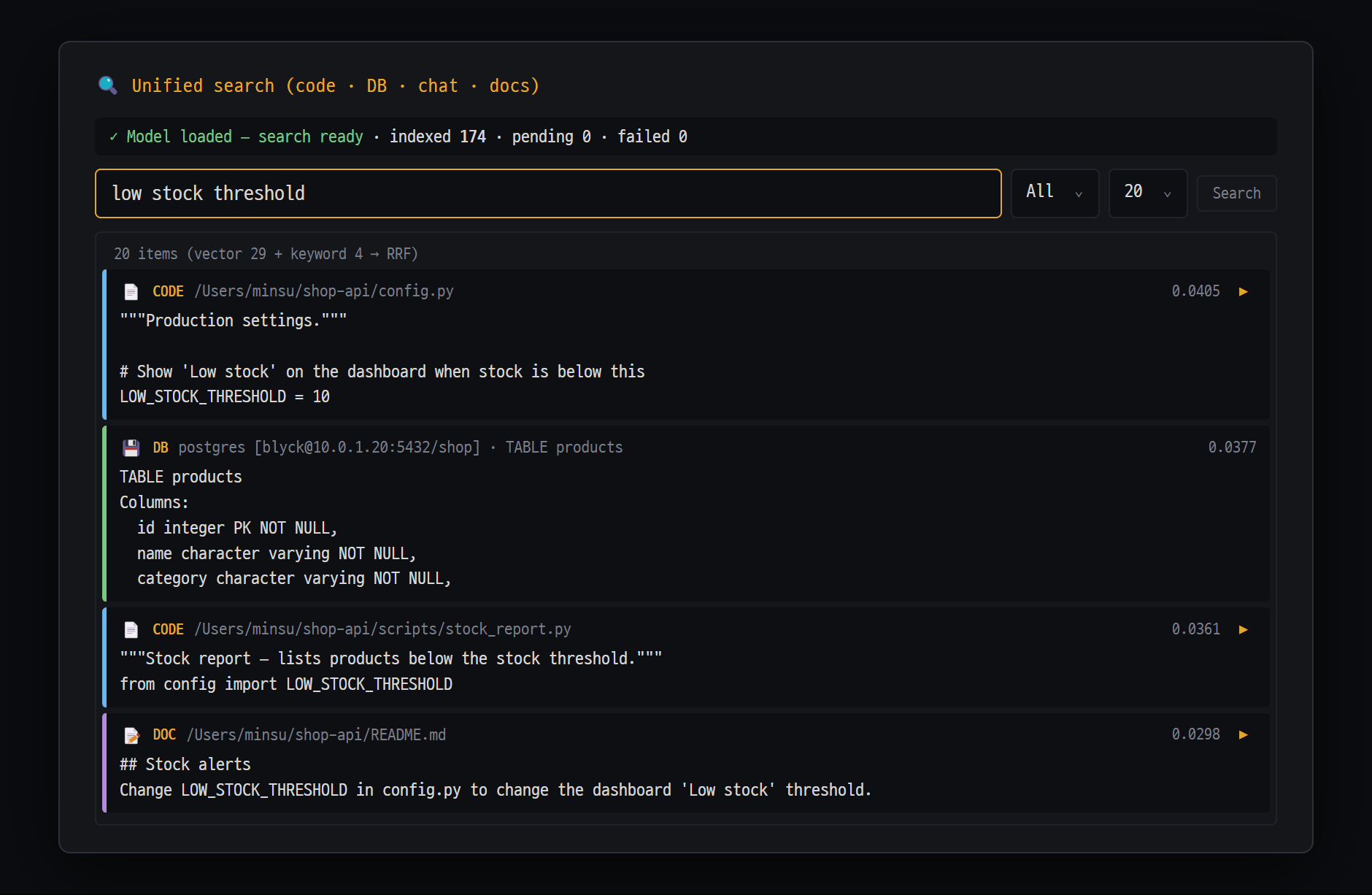
- Search terms (plain sentences are fine) · scope ("All" · code · DB · chat · docs, etc.) · number of results · "Search"
- Result cards — ranked by combining similar-meaning and matching-word results (vector + keyword → RRF). Type (CODE · DB · DOC), location and score; click to expand
- ▶ — open that file in the tree (for a chat result, open that chat)
Ctrl+K(macOSCmd+K)- Command palette (
Ctrl+Shift+P) → Unified search (code·DB·chat)
If the cursor is in a terminal (shell · SSH) panel, Ctrl+K goes to the terminal. Click another panel once, or open it from the command palette.
How to use it
Section titled “How to use it”- Open the 🔍 Unified search (code · DB · chat · docs) window with
Ctrl+K. - Type in plain words in the search box. For example:
the part that saves SSH passwordsthe encoding bug fixed last weekview that sums amounts in the orders table
- If needed, pick the scope and number of results, then press
Enter(or [Search]). - Click a result card to expand its full contents. Press ▶ to open the original (a chat opens that chat; code and documents open the file in the current tab’s file tree).
If you search with an empty box, you can browse recently indexed chunks.
The screen
Section titled “The screen”| Part | Description |
|---|---|
| Status line | Search model status (✓ Model loaded — search ready / ⏳ Loading model… / ⏸ Model download needed), indexed and pending counts, failed count (with 🔄 Retry if any) |
| Scope | All / Code / DB / Chat / Docs / Activity |
| Number of results | 20 (default) / 50 / 100 / 200 |
| Result card | Icon (📄 code 💾 DB 💬 chat 📝 doc 🔀 Git ⏱ activity record), source, location, score |
What gets indexed
Section titled “What gets indexed”You can index things yourself in the Index management section at the bottom of the window.
| Button | What it does |
|---|---|
| [📂 Index folder] | Indexes the code in the folder you pick |
| [💾 Index active DB] | Indexes the current tab’s DB tree structure (tables, views, etc.) |
| [📄 Index docs] | Text documents like .md .txt .rst .adoc, and Office (.docx .xlsx .pptx). Text files over 2MB and Office files over 10MB are skipped |
| [🌿 Index Git] | The repository’s 200 most recent commits |
| [🚫 Exclude settings] | Edit the file patterns you want left out (.termeditignore) |
| [🩺 RAG status] | Index status and cleanup tools |
Automatic indexing — When you set a project folder in AI chat, the code and documents in that folder are indexed automatically. (If you haven’t downloaded the search model yet, it starts after the download.) Remote (SFTP) project folders are indexed too, and kept separately so servers don’t get mixed up. Past chats and activity records are searchable as well.
Left out automatically — anything listed in .gitignore; the folders node_modules .git dist out build .cache .next __pycache__ venv .venv; and anything you list in .termeditignore.
Search model
Section titled “Search model”The first time you use it, a small AI model used for search is downloaded once (it runs on your PC and nothing is sent out). You can change it in the Embedding model card.
| Model | Size | Notes |
|---|---|---|
| multilingual-e5-small (default) | About 450MB | Balanced for Korean, English and other languages — recommended default |
| paraphrase-multilingual-MiniLM-L12-v2 | About 450MB | Multilingual, strong at similar meanings |
| all-MiniLM-L6-v2 (fastest) | 90MB | English-focused (weak at Korean) |
| bge-small-en-v1.5 | 130MB | English documents and code |
| multilingual-e5-base (higher accuracy) | About 1GB | High multilingual accuracy, twice the memory and disk |
| EmbeddingGemma-300M (beta) | About 1.2GB | Newest, high accuracy; may not work in some environments |
- Sizes are download sizes. While Blyck is running, the model stays in memory, so it uses roughly this much memory too (about 1GB more with search reranking on). On a PC with 8GB of memory, the default model is recommended.
- If you switch to a model of a different size, after you confirm, everything already indexed is re-indexed with the new model.
- CPU load in the Performance card: 🟢 Eco / 🟡 Balanced (default) / 🔴 Fast. If your computer lags while indexing, switch to Eco.
- 🎯 Search reranking (accuracy↑): scores the top results once more, more precisely, and re-orders them. It’s a little slower, and the first time you turn it on it downloads a model (about 1GB). Off by default.
Leaving things out — .termeditignore
Section titled “Leaving things out — .termeditignore”If files like backups, build output or logs show up in results, leave them out.
- [🚫 Exclude settings] or command palette → Edit indexing exclude patterns (.termeditignore).
- Pick a folder in Folder: (📁 local / 🌐 remote).
- Write file patterns with the same syntax as
.gitignore. Below a[db]line, write DB object name patterns.vendor/*.generated.ts[db]TMP_**_OLD - You can also add several at once with buttons: [📋 Recommended file patterns], [🗄 Recommended DB patterns], + Logs, + Temp, + Build output, and more.
- Turn on Auto-remove matching existing chunks on save and press [Save] to remove already-indexed matches right away.
Cleaning up the index — 🩺 RAG status
Section titled “Cleaning up the index — 🩺 RAG status”In [🩺 RAG status] you can see the total number of chunks, size, pending and failed counts, and the files with the most chunks. All the cleanup tools below first show how many will be deleted before deleting, and deleted items stay in the trash for 7 days before they’re removed for good.
| Button | What it does |
|---|---|
| 🔍 Orphan Scan | Cleans up chunks from files that are gone from disk and from deleted DB connections |
| 📋 Pattern Purge | Cleans up all chunks matching a pattern at once |
| 🕰 Stale Cleanup | Cleans up code chunks that haven’t changed for a long time (365 days by default) |
| ↩ Restore recent cleanup | Brings back chunks deleted within the last 7 days |
| 🗑 Empty trash now | Deletes for good without waiting 7 days (cannot be recovered) |
Unified search vs. Persistent Memory
Section titled “Unified search vs. Persistent Memory”Unified search finds “similar things”, while Persistent Memory is storage that pulls out facts the AI has confirmed, exactly. “Where was that similar code I wrote before?” is a job for unified search; “Can this PC deploy?” is a job for Persistent Memory.
There are no results Check the status line. If you haven’t downloaded the model yet, press [📥 Download model]. If it says the index is empty, add material with [📂 Index folder] / [💾 Index active DB]. Make sure the scope isn’t too narrow (set it to All) and search again.
Irrelevant results (backup or build files) show up
Add patterns to .termeditignore and press [Save]. Turning on reranking also pushes unrelated results further down.
Pressing Ctrl+K in the terminal doesn’t open it
In a terminal panel, Ctrl+K goes to the terminal. Click another panel or open it from the command palette.
Pressing ▶ doesn’t open the file The current tab needs a file tree panel for it to open.
My computer is slow during bulk indexing Change CPU load in the Performance card to 🟢 Eco. It takes effect right away.
What happens to the existing index if I change the model? If the model is a different size, everything is re-indexed. Depending on the project size, it can take a few minutes. If you cancel, it goes back to the previous model.