
Persistent Memory
Persistent memory (Agent Memory) is a store that lets the AI remember facts it has confirmed once, in later chats too. (Pro)
When you switch chats, the AI forgets “what it can do on this PC”. So in a new chat today, it may wrongly conclude that it “can’t, because it has no permission” to do a deploy that worked yesterday. Persistent memory prevents this.
| Example | Type |
|---|---|
| ”The deploy command actually succeeded on this PC” | Capability |
”This project is built with npm run build” | Procedure |
| ”Never deploy directly to the production server” | Rule |
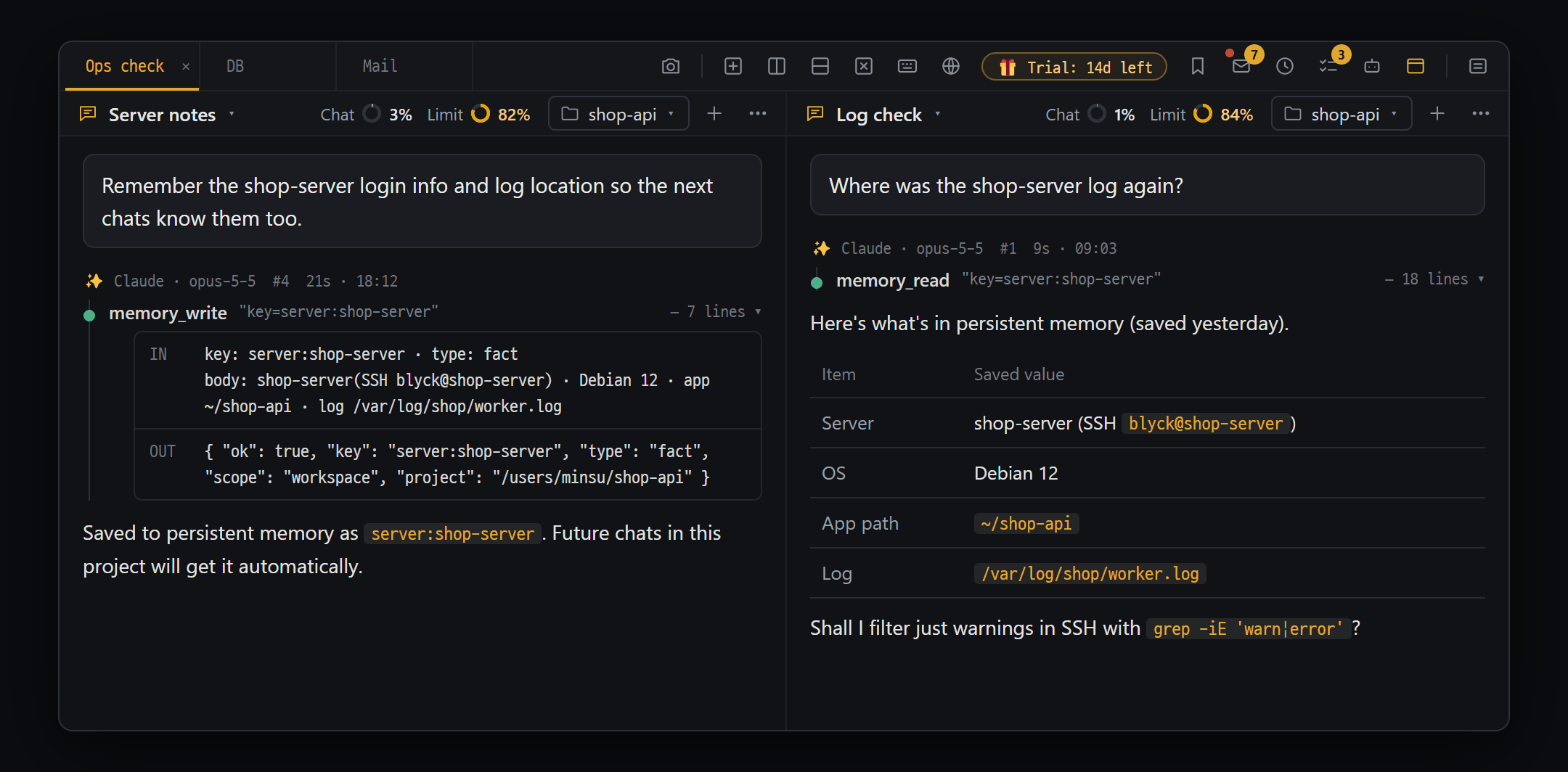
- memory_write — say "remember this" and the AI writes the confirmed fact to persistent memory under a key (server:shop-server)
- A new chat the next day — the AI pulls it up with memory_read and answers right away (this project's memory is passed along automatically with a new chat's first message)
Way ① to save — the save suggestion card
Section titled “Way ① to save — the save suggestion card”When the AI succeeds for the first time at one of the things below, a 🗂️ Save to persistent memory? [type] card appears, showing what would be saved and the evidence for it.
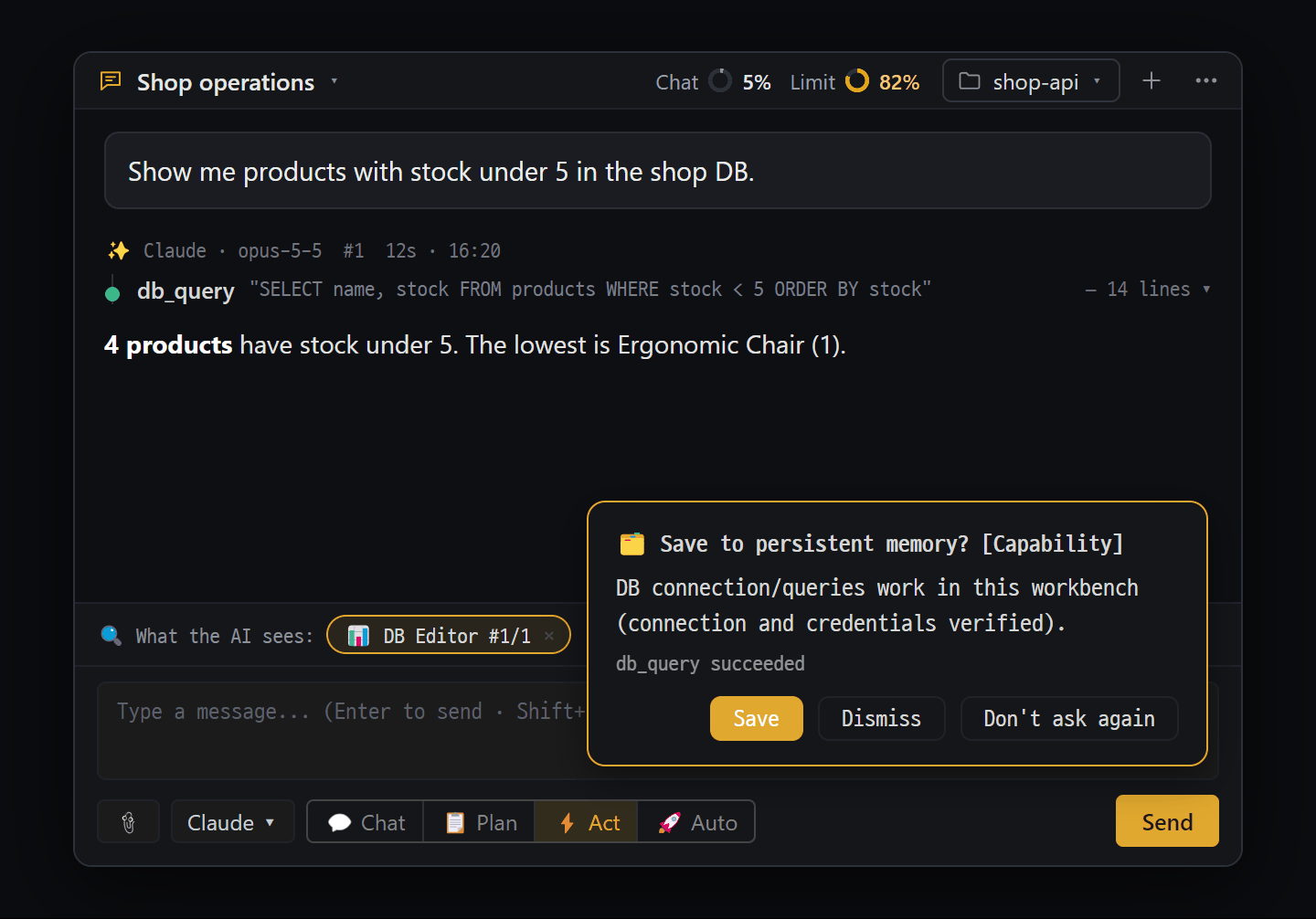
- "🗂️ Save to persistent memory? [Capability]" — appears when the AI's first DB query succeeds. Below: what will be saved and why ("db_query succeeded")
- "Save" · "Dismiss" (won't ask again until you restart the app) · "Don't ask again" (turns suggestions off). Closes after 12 seconds if you don't click
| What the AI succeeded at | Save suggestion |
|---|---|
| Deploy commands (aws s3 cp/sync, npm publish, vercel, netlify deploy, gh release create, etc.) | [Capability] Can deploy directly from this PC |
| Confirming a cloud login (aws sts get-caller-identity, gh auth status, docker login, etc.) | [Capability] Has credentials |
| Builds and packaging (npm run build, electron-builder, make, cargo build, go build, etc.) | [Procedure] Can build this project |
| DB queries / SSH commands | [Capability] Can connect to the DB / can connect over SSH |
| When you close a chat pane: any of your messages containing words like “never, always, must, forbidden” together with a target like “production, deploy, DB, push, delete” | [Rule] Your sentence as written |
| Button | What it does |
|---|---|
| [Save] | Saves it (🗂️ Saved to persistent memory) |
| [Dismiss] | Closes it. The same suggestion won’t be asked again while the app is running |
| [Don’t ask again] | Turns off the suggestion feature itself |
- If you don’t press anything, it closes on its own after 12 seconds (same as Dismiss).
- If the same content is already saved, it doesn’t ask. It never suggests saving a failed task.
- Turn the suggestion card on and off in AI Chat ⋯ → Chat settings → AI · Tools → Suggest saving to persistent memory (on by default). Turn it off while recording or presenting. Even when it’s off, the AI can still save on its own.
Way ② to save — the AI saves on its own
Section titled “Way ② to save — the AI saves on its own”The AI also records things by itself. You can simply say “remember this”. For example: “remember that the production DB is read-only”.
Types and how long they’re kept
Section titled “Types and how long they’re kept”| Type | Kept |
|---|---|
| Capability · Procedure · Rule | Kept permanently |
| Decision · Fact | If unused for 90 days, it goes dormant (no longer sent automatically); after 180 days it’s cleaned up |
- Saving the same content again (with the same label) overwrites it. Duplicates don’t pile up. If it was dormant, it comes back to life.
How memories reach the AI
Section titled “How memories reach the AI”- They’re sent automatically with the first message of a new chat. They’re chosen from those for this chat’s main folder (project) and those shared by all projects. Memories from other projects are not sent automatically.
- For a chat with no main folder set, there’s no way to tell the project apart, so memories are chosen from all of them.
- Up to 20 items at a time, 400 characters each. Rules come first (up to 5), then those related to your question (up to 10), then the rest in order of most recent.
- Anything over 400 characters is cut when sent; if the full content or something needed in later messages is required, the AI looks it up itself.
Good to know
Section titled “Good to know”- Where it’s stored: Blyck’s workspace DB on your PC (
workspace.sqlite). It is not sent anywhere. - There’s no screen yet for listing or deleting saved memories. To see them, ask the AI “show me the persistent memory”.
- Unified Search finds “similar things”, while persistent memory is a store you pull from exactly. For judging facts, persistent memory comes first.
The save suggestion card appears too often The same content is asked only once, and things already saved aren’t asked. If it still bothers you, press [Don’t ask again] on the card or turn it off in ⋯ → Chat settings → AI · Tools.
In a new chat, the AI doesn’t seem to know what it saved Memories from other projects aren’t sent automatically. Check that this chat’s main folder is the same as when it was saved. You can also ask the AI “look up anything about deploying in persistent memory”.
I want to delete a memory that was saved wrongly There’s no deletion screen yet. Try telling the AI to correct it and remember the right content. Saving with the same label overwrites the old content.
Does it work on the free plan? Persistent memory is used together with AI Chat, so it’s available with Pro (or during the trial).