
AI Teams & Automation
This page goes beyond talking with a single AI and explains features that let several AIs work together, or let the AI keep working while you’re away.
| Feature | In one line | Where to open | Free/Pro |
|---|---|---|---|
| ⚔️ AI debate | Several AIs debate the same question, then a moderator AI draws the conclusion | ⚔️ below the AI Chat input box | Pro |
| Agent Board | Gathers your open AI chats as cards so you can watch and instruct them on one screen | Robot-head icon on the tab bar | Pro (beta) |
| Scheduled runs | The AI does a job automatically at a set time | Clock icon on the tab bar | Pro |
| Background tasks 🔄 | Long-running commands run in the background, and when they finish the AI picks up where it left off | 🔄 bar above the AI Chat input box | Pro |
| Sub-chats · separate AI tasks | The AI hands part of the work to another AI | Task cards · ⏳ button | Pro |
| To-do window | What the AI asked you to do, what the AI is doing, and what you wrote down — in one place | Checklist icon on the tab bar | The window is free |
⚔️ AI debate (Pro)
Section titled “⚔️ AI debate (Pro)”Several AI models (2–4) first give their own opinions on the same question without seeing each other’s answers, then in each round they rebut or accept each other’s views and converge. At the end, a moderator AI reads the whole debate and sums up the conclusion. If the conclusion includes a task plan, after you confirm, the participant AIs can split up the work and actually do it.
This is good for design decisions where you don’t want to rely on one AI’s answer, bugs with an unclear cause, and weighing pros and cons.
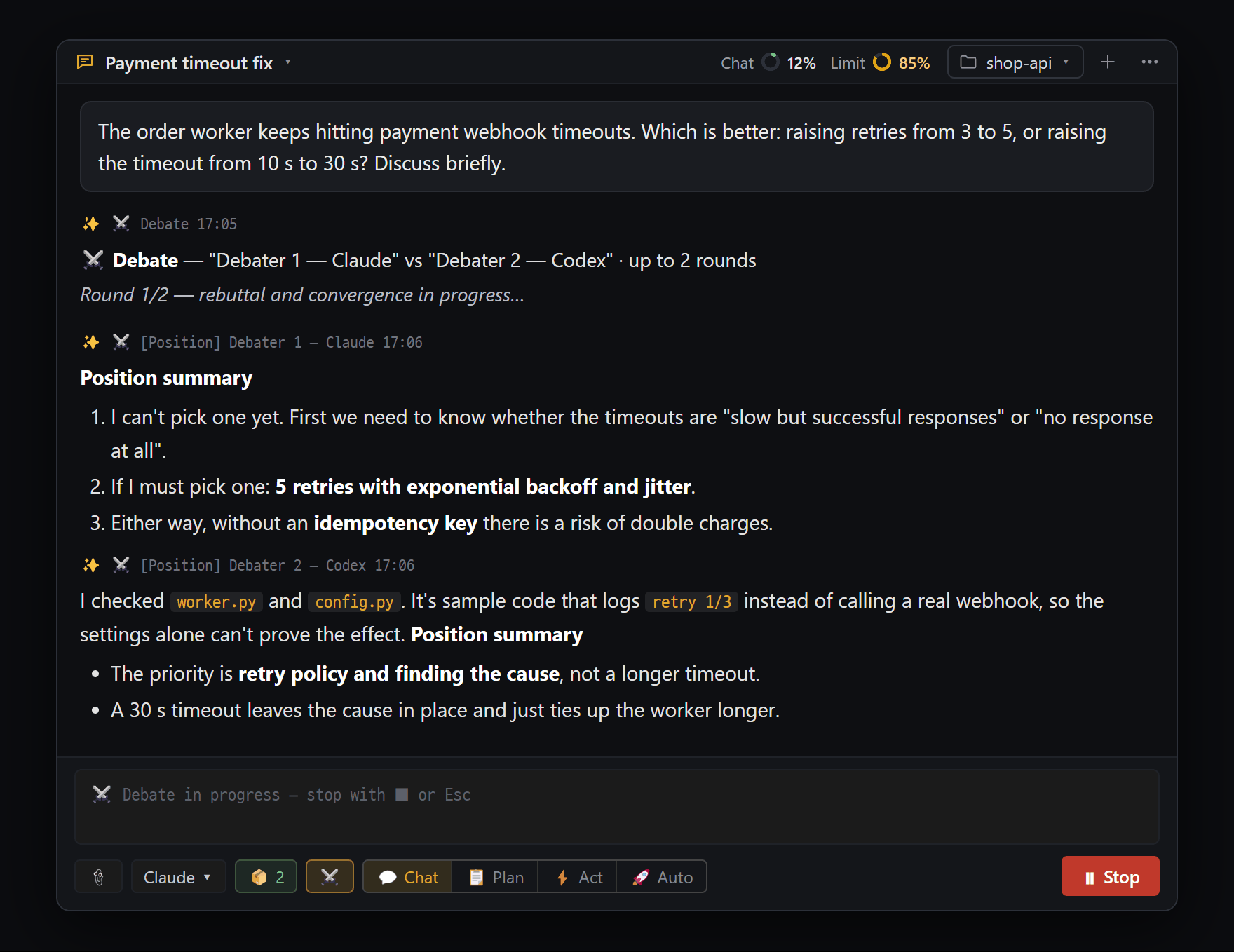
- Debate status card — "Debater 1 — Claude" vs "Debater 2 — Codex" · up to 2 rounds, current stage ("Round 1/2 — rebuttal and convergence in progress…")
- "[Position] Debater 1 — Claude" — first opinion, given without seeing the other answer (summary · reasons · what's uncertain)
- "[Position] Debater 2 — Codex" — reads the real code in the project folder to back its points. No files are changed during a debate
- A gold ⚔️ button means debate mode is on. While it runs, the send button turns into "⏸ Stop"; Esc stops it too
- Open the AI chat you want to run the debate in. If you want them to debate while looking at real code, set the project folder first.
- Press ⚔️ below the input box to open the ⚔️ Debate Mode window (if the pane is narrow, it’s inside ⋯).
- Choose a Preset, or pick Participants and Debater 1–4 yourself.
- Choose Rounds (1–3) and the Moderator, then press [Turn on].
- Send your question as usual and the debate starts. Attachments go to the participants too.
- When it’s done, read the 🏁 Debate Conclusion (Moderator Verdict) card. If there’s an action plan, choose [🤝 Start collaboration (N tasks)] or [End here].
- To turn debate mode off, ⚔️ → [Turn off]. That chat becomes a normal chat again.
| Option | What it does | Default |
|---|---|---|
| Preset | Claude vs GPT (cross-provider) · Claude internal (Fable vs Opus) · GPT internal (Sol vs Terra) · Custom | Claude vs GPT if Codex is installed, otherwise Claude internal |
| Participants | 2 to 4 | 2 |
| Rounds | How many times they rebut and converge, 1–3 | 2 rounds |
| Moderator | The AI that writes the conclusion | Auto (Claude default) |
| Auto collab | Start the work right after the conclusion without asking | Off (we recommend leaving it off) |
- Debate mode is turned on and off per chat. You can’t choose the same model for two debaters.
Progress and conclusion
Section titled “Progress and conclusion”| Stage | What happens |
|---|---|
| ① Independent positions | Each participant gives its own view without seeing the others’ answers (including its reasons and what it’s unsure about) |
| ② Rounds | Each reads the other participants’ views, first states what it agrees with, then rebuts or changes its mind. If everyone agrees, the remaining rounds are skipped |
| ③ Moderator verdict | The moderator reads the whole debate and writes the conclusion |
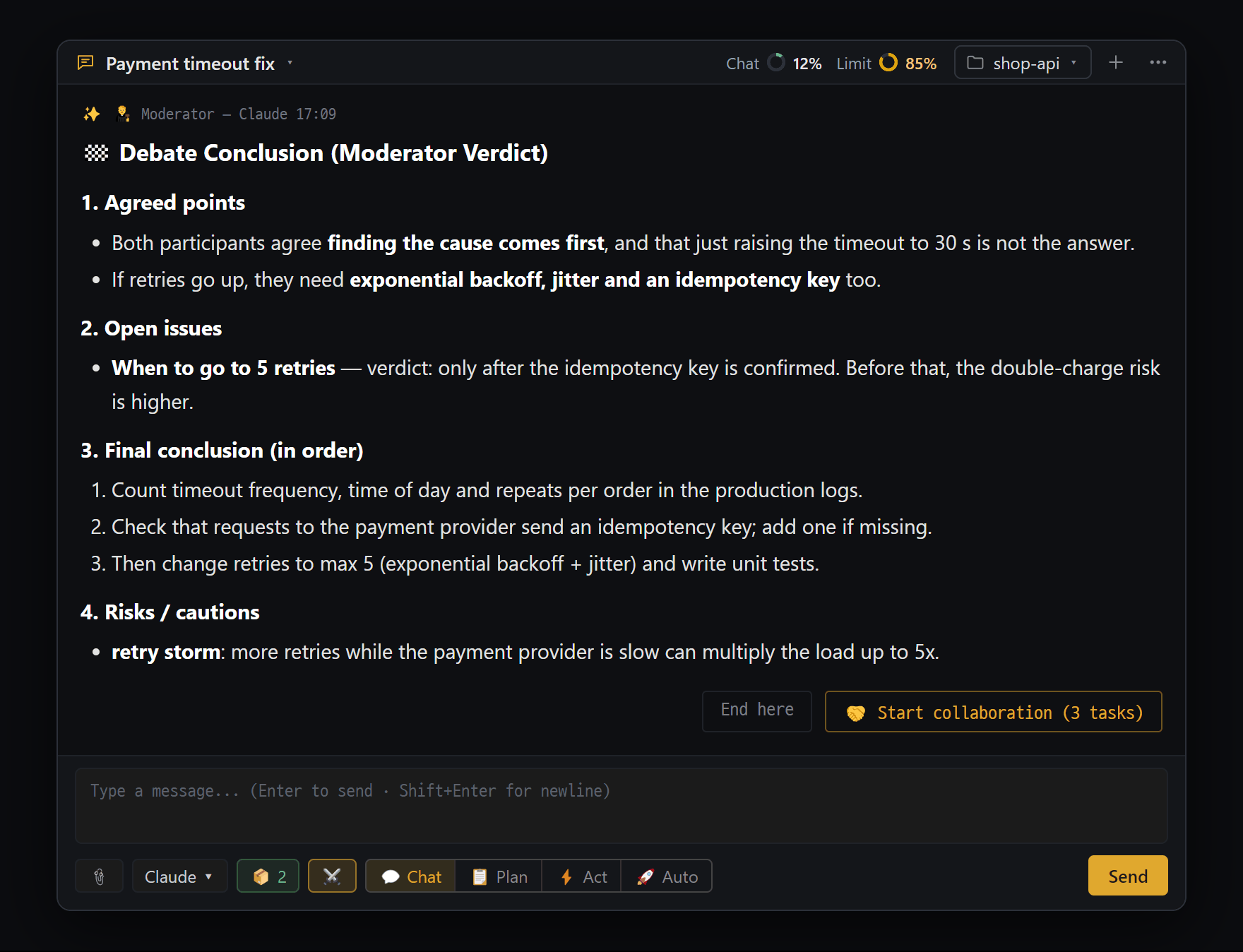
- "🏁 Debate Conclusion (Moderator Verdict)" from "🧑⚖️ Moderator — Claude" — four parts: agreements · open issues · final conclusion · risks/cautions
- If the conclusion has an action plan: [End here] / [🤝 Start collaboration (N tasks)] — click it and the participants split up the work and actually do it
- If the button is gone, you can also send "start collab" in the input. Sending any other message ends the offer
The conclusion card contains points of agreement, unresolved issues (a judgment and reason for each), the final conclusion, and risks / cautions.
Collaboration — turning the conclusion into real work
Section titled “Collaboration — turning the conclusion into real work”- If the conclusion has an action plan, a [🤝 Start collaboration (N tasks)] button appears with the task list. If the button is gone, press it in the ⚔️ window, or send start collab in the input box.
- Tasks are handed out to participants in the order they need to happen, and tasks that don’t depend on each other run at the same time.
- Each time a task is done, another participant that didn’t do it checks it. If it fails, the task is redone once.
- When everything is finished, the 🤝 Collaboration Result card shows each task as ✅ passed · ⚠️ unverified · ⛔ blocked · ❌ failed.
- File changes during collaboration go through without cards if the chat that started the debate is in 🚀 Auto; in any other mode they go through approval cards.
- The proposal ends if nothing happens for 30 minutes or you send a different message.
Good to know
Section titled “Good to know”- To stop:
Esc, ⏸ Stop, or ⏹ Stop debate or Turn off in the ⚔️ window. - Participants are real AI chats. Chats like “⚔️ Debater1 — Claude” are created in the background, and you can see them in the chat list and on the Agent Board. Files can’t be changed during the debate.
- Usage: you get participants × rounds AI answers, so it uses far more than a normal question.
- A debate in progress doesn’t continue after you restart the app. Settings and past conclusions remain.
Agent Board — many AIs on one screen (Pro, beta)
Section titled “Agent Board — many AIs on one screen (Pro, beta)”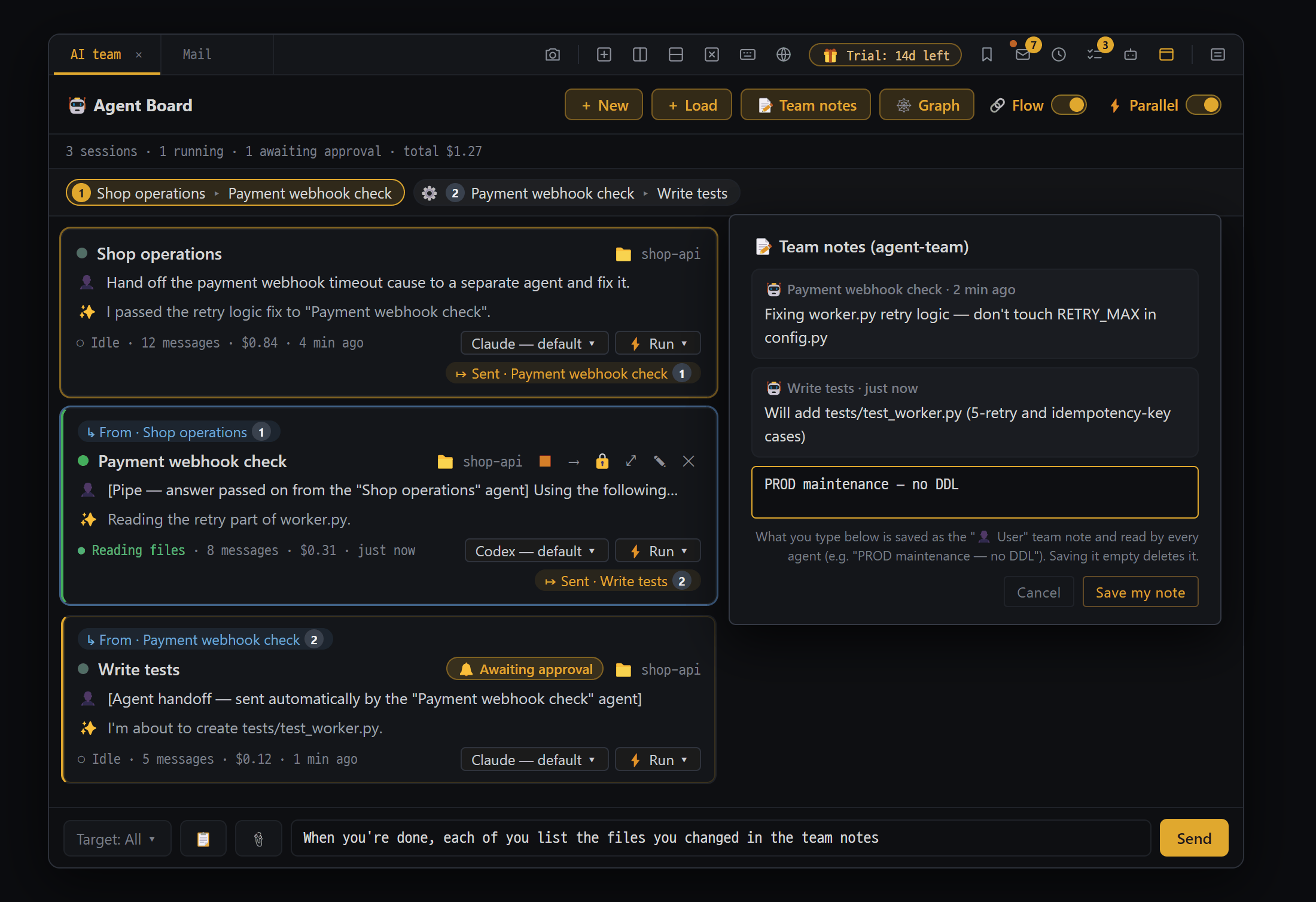
- Header — "+ New" · "+ Load" · "📝 Team notes" · "🕸 Graph", plus the "🔗 Flow" and "⚡ Parallel" switches
- 🔗 Flow row — the order in which AIs handed work to each other stacks up as "① A ▸ B" pills. Hand-offs an AI made on its own are marked ⚙
- Chat card — last request and answer summary, what it's doing now ("● Reading files"), received/sent marks, and chips to switch model and mode right there
- Shared input — gives one instruction to all the AIs picked in "Target: All ▾"
- 📝 Team notes — a shared memo where AIs write down decisions and cautions. Notes you write ("Save my note") are read by every AI too
Agent Board is a control panel that gathers your currently open AI chats as one card each on a single screen. Each card shows what it’s doing, whether it’s waiting for approval, and whether it hit an error, and you can send a quick message from the card or instruct several AIs at once. While the board is open, the AIs on it know each other as teammates, and they can hand work to each other or even create new teammates.
Where to open it — the robot-head icon on the tab bar (“Agent Board (beta)”). It’s on by default. If the icon isn’t there, check AI Chat ⋯ → Chat settings → 🧪 Lab → Agent Board (beta). Only one board opens per app.
Layout
Section titled “Layout”| Part | Contents |
|---|---|
| Header row | + New (a new AI chat as a card) · + Load (bring back conversations you closed or removed) · 📝 Team notes · 🕸 Graph · 🔗 Flow switch · ⚡ Parallel switch |
| Status row | ”4 sessions · 1 running · 1 awaiting approval · 1 error · total $0.42”. When there’s an error card, click it to jump to that card |
| 🌐 Remote teammates row | Open chats on other PCs you’ve paired with (Other PCs · Phone) |
| Card list | One card per chat |
| 🔔 Approval box | Allow or reject approval cards from several cards in one place |
| Shared input box | Instruct several AIs at once (at the bottom) |
- The ”$” amount is your usage converted into money. If you use a subscription, it isn’t actually billed separately.
A single card — status dot and title, badges (🔔 Awaiting approval / ⚠ Error / ⏳ Waiting for same folder, etc.), 📁 folder chip, 👤 last request, ✨ summary of the last answer, what it’s doing now (”● Writing file”), model chip and mode chip (click to change right there).
| Card button | What it does |
|---|---|
| ⏹ | Stops that AI while it’s answering |
| → | Sends this AI’s last answer to another AI (you can edit it before sending) |
| 🔒 | Limits the SSH/shell and DB panes this AI can use to one (so several AIs working on different servers don’t get mixed up) |
| ⤢ | Opens that chat as a real pane |
| 📌 | Takes it off the pane and keeps it only as a card |
| ✎ / ✕ | Rename / remove from the board only (the conversation isn’t closed) |
Giving instructions
Section titled “Giving instructions”- To one AI — click a card and it expands in place with a mini input box. If that AI is answering, your message is queued and sent automatically when it finishes. 📎 attachments and
/sessionwork too. - To several AIs at once — the shared input box at the bottom. In Target: All ▾ you can pick just some of them, and if you write common instructions in 📋 (for example “write commit messages in Korean”), they’re sent along every time.
- Messages sent from the board go through a run queue. Up to 5 Claude chats and 5 Codex chats can answer at the same time; beyond that, they wait their turn.
AIs working together
Section titled “AIs working together”When the board is open and there are two or more cards, each AI is told about its teammates (name, Claude/Codex, folder) and the rules for working together. So the AI can, on its own:
- Hand work to a teammate — a message with a header saying who sent it lands in the receiving chat. If the receiving AI is busy, it’s delivered when it finishes. Actual file changes still go through the receiving AI’s mode and approval cards.
- Create a new teammate — it sets a role name, AI type, folder, and mode and creates a new AI chat. A new teammate’s default mode is ⚡ Act (approval for every change).
These two only work when that AI is in 📋 Plan, ⚡ Act, or 🚀 Auto mode.
- Preventing too much back-and-forth — within 15 minutes: 3 times to the same teammate, 4 round trips between two AIs, 8 sends in total from one AI, up to 5 new teammates. Beyond that, a 🛑 Loop guard notice appears, the action is blocked, and the AI is told to report to you.
- 📝 Team notes — a shared memo where the AIs write down decisions and cautions. If you write something like “PROD maintenance in progress — no DDL”, every AI reads it.
- ⚡ Parallel — when on (default), AIs in the same folder work at the same time, and one waits briefly only when two try to edit the same file at once. When off, AIs in the same folder work one at a time.
- 🔗 Flow / 🕸 Graph — see who handed work to whom, as a row of pills or as a big picture.
Good to know
Section titled “Good to know”- Only AI chats that are currently open appear on the board. As long as a chat is on a card, the AI keeps working even if it’s not showing in a pane.
- Board settings (card order, expanded state, switches) stay on this PC but are not included in backup files.
Scheduled runs (Pro)
Section titled “Scheduled runs (Pro)”At a set time or interval, the AI runs a job automatically. You write what to do as a sentence, just like in a normal chat. For example: “Check the server’s disk usage and tell me if it’s over 80%”.
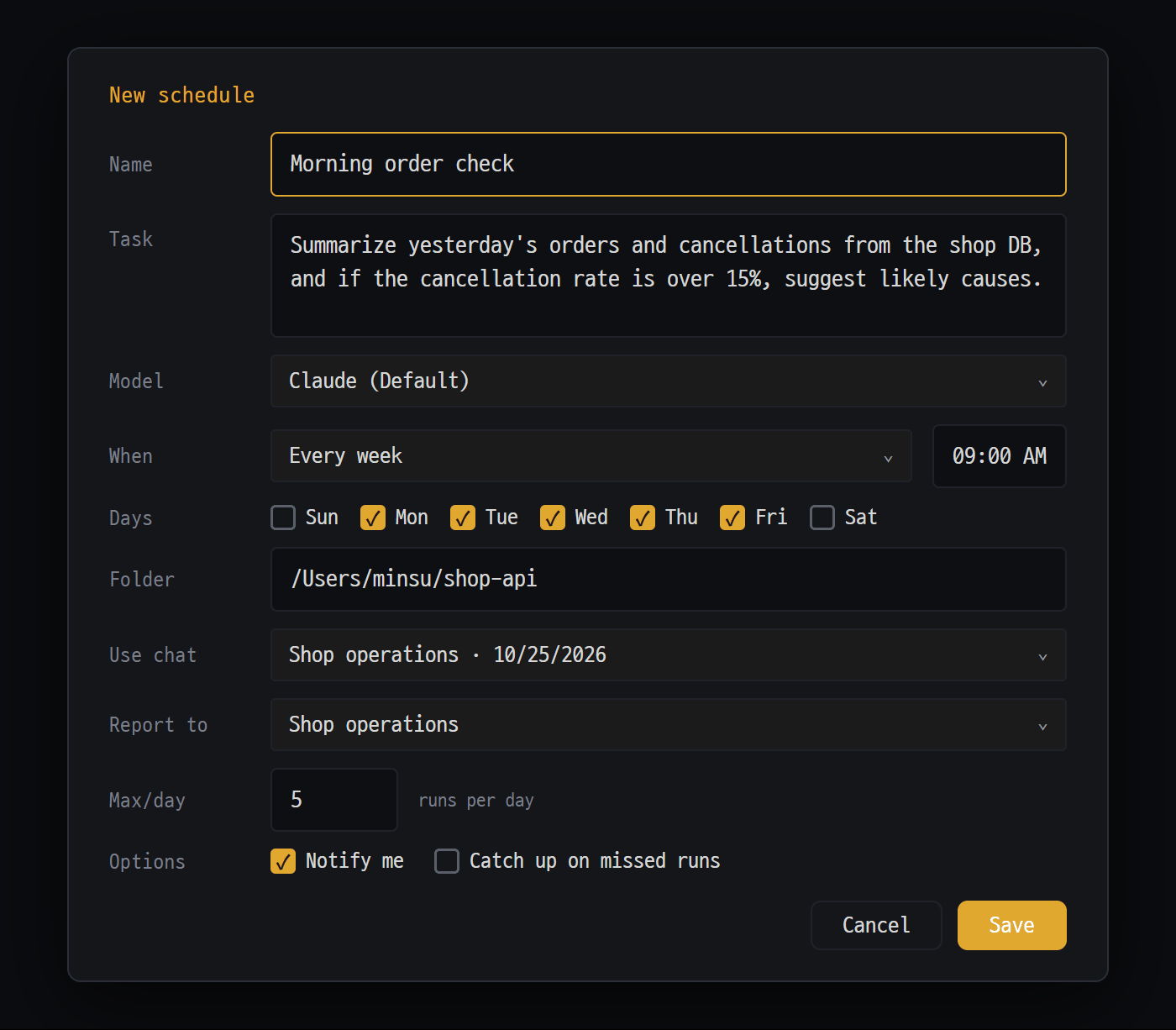
- Task — write what the AI should do as a sentence, just like in chat
- When — every day · every week · every so often. For every week, tick the days
- Chat to use (shares that chat's recent conversation and folder) and chat to report to (when done, that chat's AI picks up the result)
- Options — "Notify me" when done, and "Catch up on missed runs" for runs missed while the app was closed
Where to open it — the clock icon on the tab bar (“Scheduled runs”), command palette → Scheduled runs, or ⏰ Schedule on one of your own to-dos in the to-do window. Schedules live in the Automations window together with mail rules.
Creating a new schedule
Section titled “Creating a new schedule”- Clock icon → Automations window → [+ New automation].
- Choose ⏰ At a set time.
- Write a Name and the Task.
- Choose the Model, When (every day / every week / every so often), and the time.
- If needed, set Folder, Use chat, Report to, Max/day, and Options, then press [Save].
| Field | What it does | Default |
|---|---|---|
| Model | The AI and model to run (both Claude and Codex work) | First item in the list |
| When | Every day · every week (check the days) · every so often (minimum 5 minutes) | Every day 09:00 |
| Folder | The folder the AI works in (folders on this PC only) | Empty |
| Use chat | Each run also passes along that chat’s recent conversation and folder | None |
| Report to | When finished, that chat’s AI takes the result and gives a short report (only if it’s open) | None |
| Max/day | Maximum number of automatic runs per day | 5 |
| Notify me | Windows / Mac notification when it finishes | On |
| Catch up on missed runs | Runs once at startup for schedules that passed while the app was off | Off |
List and results
Section titled “List and results”Each schedule row has its name, when it runs, and the buttons ▶ (run now) · ⏹ (stop) · ⏸ / Turn on · ✎ (edit, delete). Click the name to see the next run time and the last result; click the last-result line to expand the run log (last 20 runs). Use [View result] to see the AI’s full result.
| Log entry | Meaning |
|---|---|
| Done / Failed / Stopped | Finished normally / error (including timeouts) / you stopped it or closed the app |
| Missed | The app was off or the PC was asleep at that time |
| Skipped | Reached Max/day, etc. |
| Could not start | The AI couldn’t be launched (concurrency limit, AI not installed, etc.) |
Good to know
Section titled “Good to know”- Blyck must be running for schedules to run. Schedules that came up while it was off become “Missed”.
- A single run lasts up to 60 minutes.
- After 3 failures in a row, the schedule turns itself off (⛔). Fix the cause, then press Turn on.
- Schedules and separate AI tasks together can run up to 5 at a time.
- A remote (SFTP) folder can’t be used as a schedule’s folder (schedules run on this PC).
- In the free state after the trial ends, you can still create and edit schedules, but they don’t run, and the log shows Skipped — Skipped on the free plan — runs with Pro. This doesn’t count as a failure, so once you start Pro they run again as before.
- The schedule list is included in backup files.
Background tasks 🔄 (Pro)
Section titled “Background tasks 🔄 (Pro)”For commands that take several minutes or more — builds, packaging, full test runs — the AI runs them in the background and finishes its answer first. Meanwhile you keep using the chat, and when the command finishes, the AI takes the result and continues on its own to wrap up.
The AI uses this on its own, so there’s nothing to turn on. You can also say “run the build in the background”. It looks the same in Claude chats and GPT (Codex) chats.
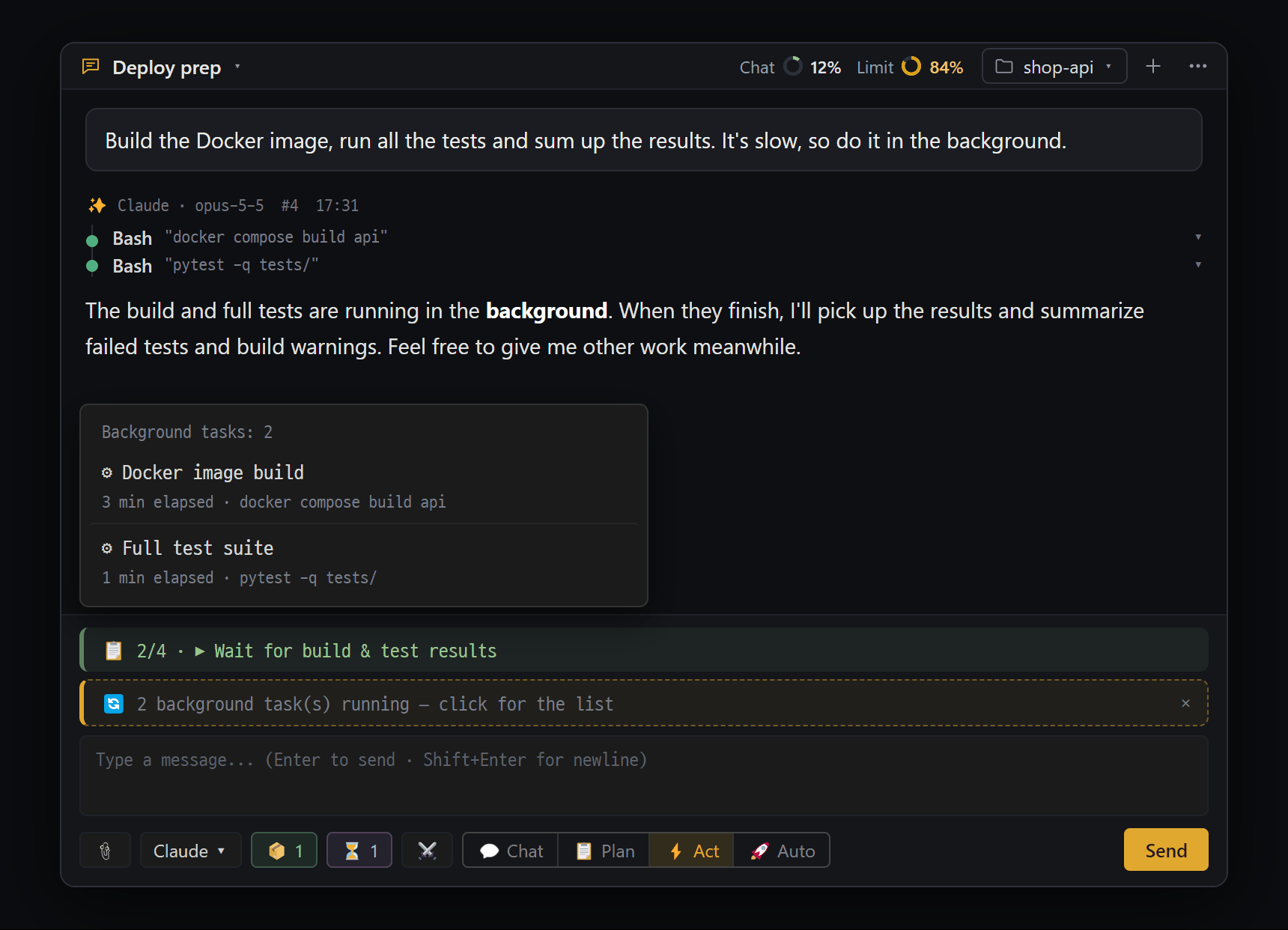
- The AI runs long commands in the background and finishes its reply first. When they're done, it picks up the results and wraps up on its own
- "🔄 N background task(s) running — click for the list" — stays above the input until every task is done (✕ only hides it). "📋 2/4" above is the AI's progress
- List — each task with a ⚙ description and "3 min elapsed · command run"
- ⏳ N — number of separate AI tasks the AI started. Click to open the "⏳ Background Tasks" list
- 🔄 status bar — right above the input box: ”🔄 N background tasks running — click for the list”. Click it to see each task’s description, elapsed time, and command. In GPT chats you can stop commands one by one with ■. The ✕ on the right only hides the bar (the tasks keep going).
- Automatic continuation — when a task finishes, a new answer starts with the notice ”↩ Background task done — the AI is responding”.
- When it doesn’t continue: the chat is closed, less than 1 minute has passed since you stopped it, or it went over 6 times within 15 minutes. In that case, send continue in the chat.
- Commands that never end by themselves, like servers, stay as 🔄. Stop them if you don’t need them.
- The background task list disappears when you restart the app. GPT chats can have up to 5 background commands at the same time across the whole app.
Sub-chats · separate AI tasks (Pro)
Section titled “Sub-chats · separate AI tasks (Pro)”There are two ways the AI can hand work to another AI. The AI uses both on its own, and both work only when the chat is in 📋 Plan, ⚡ Act, or 🚀 Auto mode.
-
Sub-chat — when the AI you’re talking to needs a big analysis or a different point of view, it sends Claude a single question, gets the answer, and uses it in its own reply. No new chat is created; it shows as one line in a task card.
-
Separate AI task — launches a completely separate AI with the same AI and the same project folder and has it work in the background. Because it uses quota separately, the AI is told to use it only when you clearly say “run this as a separate AI”.
-
The ⏳ N button below the input box: ”⏳ 2” while tasks are running, ”✓ 1” when some have finished but you haven’t looked yet. Click it to see the list and the full results. You can also open it with command palette → Background task list.
-
When a task finishes, the chat that launched it wakes up on its own, checks the result, and wraps up.
-
Up to 5 at a time (together with schedules), up to 60 minutes per task. Separate tasks run without approval cards.
To-do window
Section titled “To-do window”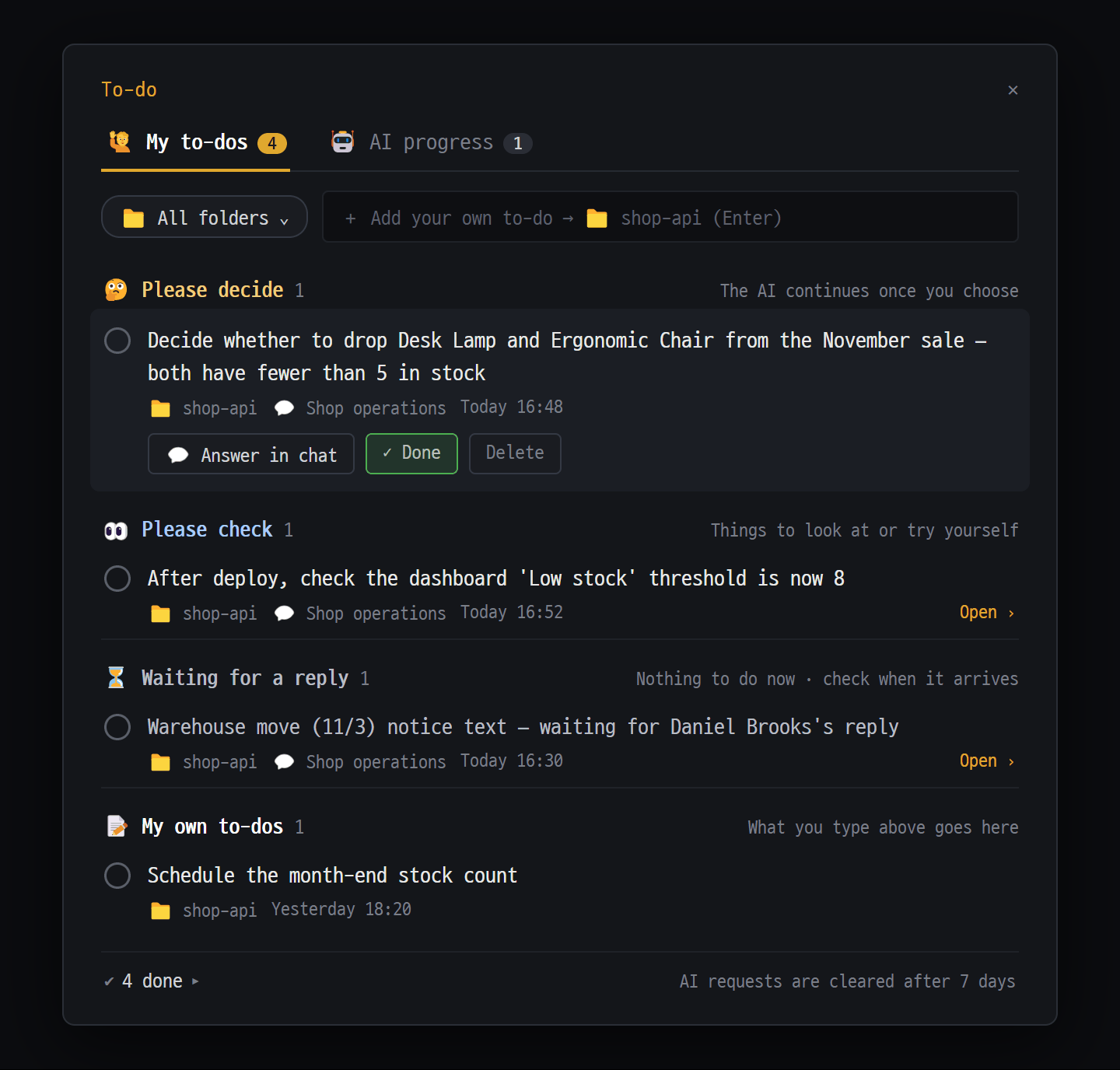
- Two tabs: "🙋 My to-dos" and "🤖 AI progress". The numbers are unfinished to-dos / tasks in progress
- Pick a project folder in "📁 All folders", type in "+ Add your own to-do" and press Enter
- "🤔 Please decide" — items where the AI is waiting for your decision. Click a row for [💬 Answer in chat] [✓ Done] [Delete]
- Finished items collapse into "✔ N done". To-dos the AI asked for are cleared automatically after 7 days
The to-do window gathers three things in one place.
- What the AI asked you to do — when the AI says “please decide this” or “please check after deploying”, it also writes it down here. Even if the chat gets long and it scrolls up out of view, you can find it here again.
- To-dos you wrote yourself
- The steps of what the AI is doing right now — progress on multi-step tasks
To-dos are saved per project folder and aren’t tied to a chat, so they stay even when you start a new conversation.
Where to open it — the checklist icon on the tab bar (“To-do”), command palette → To-do, or the 📋 progress bar above the AI Chat input box. The number on the icon is how many “My to-dos” are still unfinished across all folders.
🙋 My to-dos
Section titled “🙋 My to-dos”| Group | Meaning |
|---|---|
| 🤔 Please decide | Things where the AI is waiting for your decision — once you choose, the AI continues |
| 👀 Please check | Things you need to look at or try yourself |
| ⏳ Waiting for a reply | Things waiting on an outside reply or process — nothing to do right now |
| 📝 My own to-dos | Things you wrote yourself |
- Click the circle on the left to mark it done. Click a row to expand it and show buttons: 💬 Answer in chat / 💬 View in chat (opens the chat that asked), ⏰ Schedule (turns one of your own to-dos into a schedule), ✓ Done, Delete.
- Writing your own: type in the box at the top, ”+ Add your own to-do → 📁 folder name (Enter)”, and press
Enter. - If you say something in the chat like “I checked that” or “let’s go with A”, the AI finds it in the list and marks it done.
- You can also add items with Add to to-dos › on a mail card.
🤖 AI progress
Section titled “🤖 AI progress”These are the steps the AI goes through while working in a chat. You only need to watch — if something comes up that you need to do, the AI adds it to “My to-dos” separately. Each chat shows a progress bar (“step 4 / 5”) and a step list (✔ done · ▶ now · ○ remaining).
📋 Progress bar — while the AI is doing something that takes 3 or more steps, ”📋 2/5 · ▶ current step” shows right above the input box. Click it to open the 🤖 tab of the to-do window.
Good to know
Section titled “Good to know”- For the AI to leave to-dos, the chat must have a project folder set.
- Automatic cleanup: finished AI task lists after 2 days, AI task lists unchanged for over 14 days after 14 days, and finished “things the AI asked you” after 7 days. To-dos you wrote yourself are never deleted automatically.
- The to-do list is included in backup files.
A debate participant was “treated as forfeit” That participant didn’t answer within 5 minutes or hit an error. The debate continues with the remaining participants. Check that AI’s login and usage limit.
I see ”❌ Debate stopped — moderator verdict failed” The moderator AI couldn’t answer. Check your Claude login and usage limit, then send the same question again.
There’s no robot icon on the tab bar Check AI Chat ⋯ → Chat settings → 🧪 Lab → Agent Board (beta).
A message I sent from the board is stuck on ”⏳ Waiting for same folder” / ”⏳ Waiting for concurrency limit” Another AI in the same folder is working (when ⚡ Parallel is off), or the limit of 5 simultaneous answers has been reached. It’s sent automatically once there’s room. If it’s urgent, Shift+click the badge; to cancel, just click it.
The AI says “Agent Board is not open” Handing work between AIs and creating teammates only work while the board is open. Open the board and check that the chat is on a card.
A schedule didn’t run Expand its run log. If it says “Missed”, the app was off or the PC was asleep (if you turn on Catch up on missed runs, it runs once at startup). If it says “Skipped — Max/day”, raise Max/day. If it says ”⛔ Stopped after repeated failures”, fix the cause and press Turn on.
The result doesn’t arrive in the Report to chat It only takes over while that chat is open. If it’s closed, check with [View result] in the log.
The build finished but the AI didn’t continue Just send continue in the chat.
The AI said “please check” but it’s not in the to-do window The chat may not have a project folder, or the AI may have only said it in text. Say “put that in my to-dos”. Also check that the 📁 filter isn’t set to a different folder (📁 All folders).