
Backup · Chat Sync · Privacy
Everything you need to use Blyck for a long time, with peace of mind.
- When you move to a new PC or reinstall — Backup/Migrate, Chat sync
- Where your information goes — Privacy
- Where your data is — Storage locations
Backup/Migrate (Export · Import)
Section titled “Backup/Migrate (Export · Import)”Bundle your AI chat history, change history, saved connections, and settings into one file (.blyckbundle), export it, and import it as is on another PC or a reinstalled Blyck. It works even across operating systems, such as Windows → Mac or Mac → Windows.
Where to open it: Command Palette (Ctrl+Shift+P) → Backup / Migrate (Export·Import). There’s no button on the toolbar.
What’s included
Section titled “What’s included”| Included | Can you choose? |
|---|---|
| AI chat history (list, content, project folder info) | Always included |
| Saved connections (DB·SSH·SFTP·VNC·WinRM) and mail account settings | Always included (for passwords, see below) |
| DB query history and snippets, screen layout, display language, search model settings | Always included |
| Scheduled runs and mail rules, to-do window lists | Always included |
| Attachments (images you attached to chats, etc.) and copies kept for reverting | Include attachments (images, etc.) (on by default) |
| Change history | Include change-history DB (on by default) |
| Passwords and tokens (connection passwords, SSH key passphrases, mail sending passwords, GitHub token) | Only when encrypted with a password |
| Not included | On the new PC |
|---|---|
| Unified search index | Rebuilt automatically on the new PC |
| Persistent memory and shared notes | They live in the same file as the search index, so they’re left out too. Have the AI remember the facts you need again |
| Downloaded mail | Like a first connection, the new PC downloads the last 30 days of mail from the mail server again |
| License | Enter your key again on the new PC (one key works on up to 3 PCs) |
| Remote access pairings, chat sync settings | Set them up again on the new PC |
| Screen-side settings such as named layouts, font size, and chat style | Not carried over |
| AI program logins | Log in to Claude Code and Codex again |
What happens to passwords
Section titled “What happens to passwords”Blyck locks saved passwords with this PC’s operating system password vault (Windows DPAPI, Mac Keychain). That lock can only be opened on the same PC, so for backups you choose one of two options.
| Option | Passwords and tokens | On the new PC |
|---|---|---|
| No encryption (default) | Exported without them. Even if the file falls into someone else’s hands, it contains no passwords | Enter passwords again when you connect |
| 🔒 Encrypt with a password | The whole file is locked with a backup password, with passwords and tokens included inside | Enter the backup password, and they’re locked again with the new PC’s password vault and saved |
Exporting
Section titled “Exporting”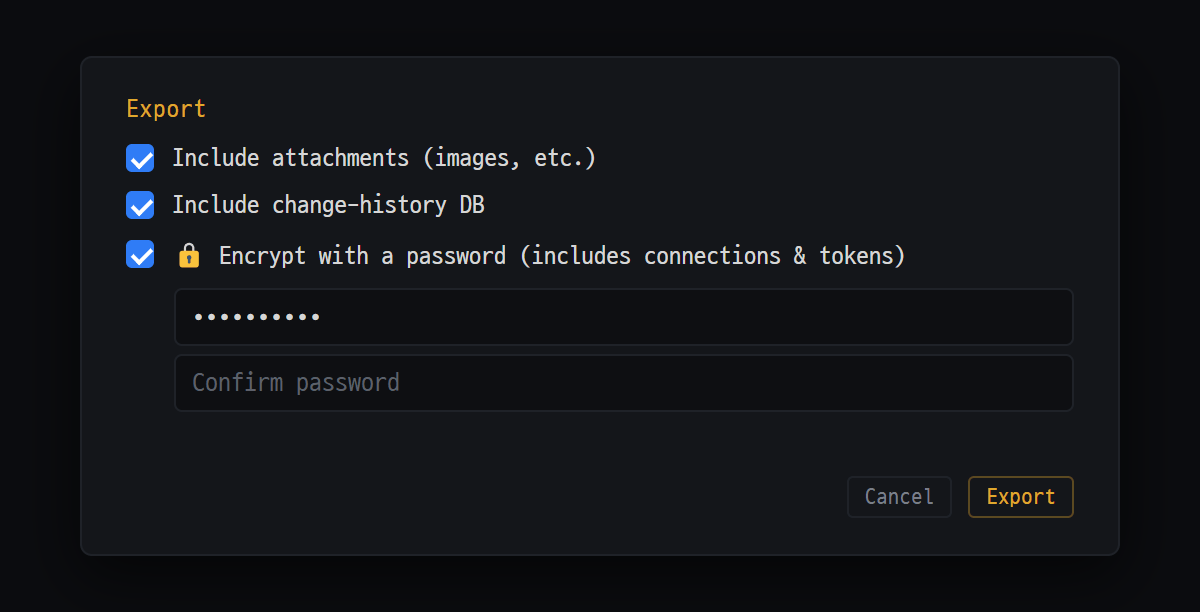
- Include attachments (images, etc.) · Include change-history DB — on by default
- 🔒 Encrypt with a password (includes connections & tokens) — saved passwords and tokens are only included when this is on
- [Export] — saves everything as one .blyckbundle file
- In the Backup / Migrate (Export·Import) window, press [Export].
- Choose what you want from Include attachments (images, etc.), Include change-history DB, and 🔒 Encrypt with a password (includes connections & tokens). If you turned on encryption, enter the same password in both boxes.
- [Export] → choose where to save. The default file name is
blyck-backup-<date>.blyckbundle. - When you see Done — (saved path) and N chats, you’re finished.
- Move the file to the new PC by USB, cloud storage, or similar.
If a chat is in the middle of an AI answer, “Try the backup again after the AI reply or tool run finishes.” appears. Try again after the answer finishes.
Importing
Section titled “Importing”-
Install Blyck on the new PC and start it.
-
Command Palette → Backup / Migrate (Export·Import) → [Import] → choose the
.blyckbundlefile. -
If the backup is encrypted, enter the backup password.
-
In the Path mapping & import window, change the project folder paths used on the old PC to the paths on the new PC (for example,
D:\work\shop→/Users/me/work/shop).\and/are adjusted automatically. -
Choose how to import.
Option What it does Replace (default) Writes everything in the backup to this PC. Saved connections, screen layout, schedules, to-dos, and change history are also replaced with the backup’s. Before overwriting, the old data is kept in a _pre-import-<time>folderMerge Adds only the chats from the backup. Existing chats, settings, and connections stay as they are -
[Import (replace)] or [Import (merge)].
-
Quit Blyck and start it again. The imported content appears only after a restart.
-
To do on the new PC: enter the license key again, log in to the AI programs, pair devices for remote access, and set up chat sync if needed.
- Recommended order: export on the old PC → install on the new PC → start it once → import (Replace) → restart. If you’ve already worked on the new PC, choose Merge.
- Even with Replace, chats that existed only on this PC are not deleted.
- The backup file is checked for damage before importing. If the check fails, none of this PC’s data is changed.
Chat sync
Section titled “Chat sync”Pick one folder that several PCs can all see, such as a OneDrive·iCloud Drive·Dropbox folder or a company network drive, and your PCs keep their AI chat history in sync automatically. You can continue a chat from your work laptop on your home PC.
- Only chat history is synced. Connection info, settings, attachments, and mail are not.
- The other PC can be turned off. Viewing and operating another PC’s chats in real time is remote access.
Where to open it: Command Palette (Ctrl+Shift+P) → Chat sync.
- On each PC, install a cloud folder program such as OneDrive and log in with the same account.
- On the first PC, open the Chat sync window and use [Browse] to pick a folder for Blyck inside the cloud folder.
- Enter a Device name (for example, “Work laptop”).
- Turn on Sync automatically (every 10 min). To sync right away, press [Sync now].
- On the second PC, pick the same folder, enter a different device name, and turn on automatic sync.
- You’re done when both devices appear under Connected devices.
| Field | What it does |
|---|---|
| Size limit | Chats larger than this size (MB) are not uploaded (0 means no limit) |
| Last sync | 📥 time received / 📤 time sent |
| [Sync now] result | 📥 N 📤 N ⏸ N = chats received · chats sent · chats skipped because they’re in use right now |
Sync rules
Section titled “Sync rules”- Each PC writes only to its own area inside the shared folder. So two PCs never break the same file by editing it at the same time.
- If the same chat exists on both sides, the side that wrote last wins. Before overwriting, your side’s content is kept separately (the last 3 per chat, for up to 14 days).
- Chats written on this PC within the last 30 minutes are not overwritten; they’re put off until next time (⏸).
- Chats you deleted are not downloaded again. The originals on other PCs are not deleted.
Privacy — what leaves your PC
Section titled “Privacy — what leaves your PC”Blyck is an app that runs on your PC. Your code and documents, terminal content, DB query results, mail, and saved passwords are not sent to Blyck’s servers. Usage statistics, such as what you clicked in the app, are not sent either.
What Blyck itself exchanges with the outside (5 things)
Section titled “What Blyck itself exchanges with the outside (5 things)”| When | What | Where to |
|---|---|---|
| ① Update check (about 5 seconds after start, then every 4 hours) | Request for new version info | update.blyck.dev |
| ② License verification (when you enter a key, and every time the app starts) | License key + a string that identifies the device | The payment company Lemon Squeezy (does not go through Blyck’s servers) |
| ③ Send diagnostics — only when you press the button | Recent error records with sensitive information masked + app version and OS | Blyck’s operations storage (AWS Seoul), deleted automatically after 90 days |
| ④ AI features (when you use AI) | The questions you send and the screen content the AI sees (code you’re editing, terminal output, etc.) | Directly, with your own account, to the AI company you installed and logged in to (Anthropic, OpenAI). Does not go through Blyck’s servers |
| ⑤ Phone notifications — only if you turn them on in the mobile app | Notification type, PC name, chat title (up to 20 characters; can be turned off in the phone app’s settings), lock-screen progress numbers (e.g. 3/7 — step names are not sent). Never conversation content, commands, or files | Blyck notification server (AWS Seoul) → Google and Apple notification services → your phone. Notification text is not stored |
There are also connections that only download files without sending your information — unified search model files (Hugging Face), editor language servers (npm·GitHub), and looking up mail server settings.
Places you connect to
Section titled “Places you connect to”SSH·SFTP·DB·VNC·WinRM servers, mail servers, your other PCs and phones paired for remote access (directly over Tailscale — including approval details, folders, to-dos, and PC screen pictures), GitHub, addresses opened in the web preview, the chat sync shared folder — all traffic goes only to places you chose yourself and does not go through Blyck’s servers.
Reducing what the AI sees
Section titled “Reducing what the AI sees”By default, AI chat also sees the content of the panel that’s currently open. If you don’t want to send it, go to ⋯ at the top of the AI chat panel → Chat settings → Context and turn off Auto-detect active panels, or choose the kinds not to send in Hide session types.
- Full privacy policy: blyck.dev/legal/privacy · Contact: support@blyck.dev
Sending diagnostics and logs
Section titled “Sending diagnostics and logs”If something goes wrong, go to ⋯ at the top of the AI chat panel → Chat settings → Diagnostics:
- [📁 Open log folder] — opens the log folder. Nothing is sent.
- [📤 Send diagnostics] — shows what will be sent first, and sends only when you press [Send]. When it’s done, a ticket number appears; send the ticket number and the symptoms to support@blyck.dev.
If you haven’t set up the AI yet, press Explore without AI in the setup wizard, then press ⋯ → Chat settings. For more, see Troubleshooting.
Storage locations
Section titled “Storage locations”| What | Windows | macOS |
|---|---|---|
| Data folder (almost all settings, chats, and history) | %APPDATA%\blyck | ~/Library/Application Support/blyck |
| Log folder | %APPDATA%\blyck\logs | ~/Library/Logs/blyck |
| Extra settings in your home folder | C:\Users\<name>\.termedit | ~/.termedit |
| App install location | Default %LOCALAPPDATA%\Programs\Blyck | /Applications/Blyck.app |
- On Windows, type
%APPDATA%\blyckinto the File Explorer address bar and pressEnter. On a Mac, pressCmd+Shift+Gin Finder and enter the path. - Uninstalling Blyck leaves the data folder in place. If you reinstall, you pick up right where you left off.
- It’s normal for the old name (termEdit) to remain in internal names such as
.termedit.
Inside the data folder (main items)
Section titled “Inside the data folder (main items)”| Name | Content | In backups |
|---|---|---|
chats\ | AI chat history | ○ |
attachments\ | Chat attachments (deleted automatically after 30 days) | Optional |
blyck-history.db | Change history | Optional |
connections.json | Saved connections and mail accounts (passwords are stored locked) | ○ |
layout.json | Tab and panel layout | ○ |
schedules.json · todos.json | Scheduled runs and mail rules / to-do window | ○ |
license.json · trial.json | License / free trial record | × |
workspace.sqlite | Unified search index, persistent memory | × |
mail\ | Downloaded mail, attachments, mail settings (only the last year of mail is kept on the PC) | × |
chat-sync.json | Chat sync settings | × |
Frequently asked questions
Section titled “Frequently asked questions”Q. Chats still don’t show up after importing. You haven’t restarted yet. Quit Blyck and start it again.
Q. “Incorrect password.” keeps appearing. The backup password is case-sensitive. If you forgot it, that file can’t be opened, so export again from the old PC.
Q. “BUNDLE_INTEGRITY_FAILED” appears. The file was damaged while being moved. Copy the original again (this PC’s data has not changed).
Q. “bundle schema too new” appears. The backup was made with a newer Blyck. Update Blyck and try again.
Q. After importing, it asks for passwords when I connect. The backup wasn’t encrypted, or you imported with Merge. Enter the passwords again.
Q. AI chat says it “can’t find the folder”. You left the path mapping empty, so the old PC’s path remained. Pick the chat’s project folder again with the new path.
Q. Mail and persistent memory aren’t on the new PC. These items aren’t included in backups. Download mail from the server again, and have the AI remember things again for persistent memory.
Q. The other PC doesn’t show up in chat sync. Check that both PCs picked the same folder, and wait until the cloud program has finished moving the files.
Q. Only some chats don’t sync. They’re larger than the size limit, or were written within the last 30 minutes (⏸). Raise the size limit or try again a bit later.