AI sees your servers, DBs and terminals
and fixes them directly
Risky actions are held back by approval cards, and you can approve from your phone too (phone app coming soon). AI costs come from the Claude or ChatGPT subscription you already have — no extra AI fees.
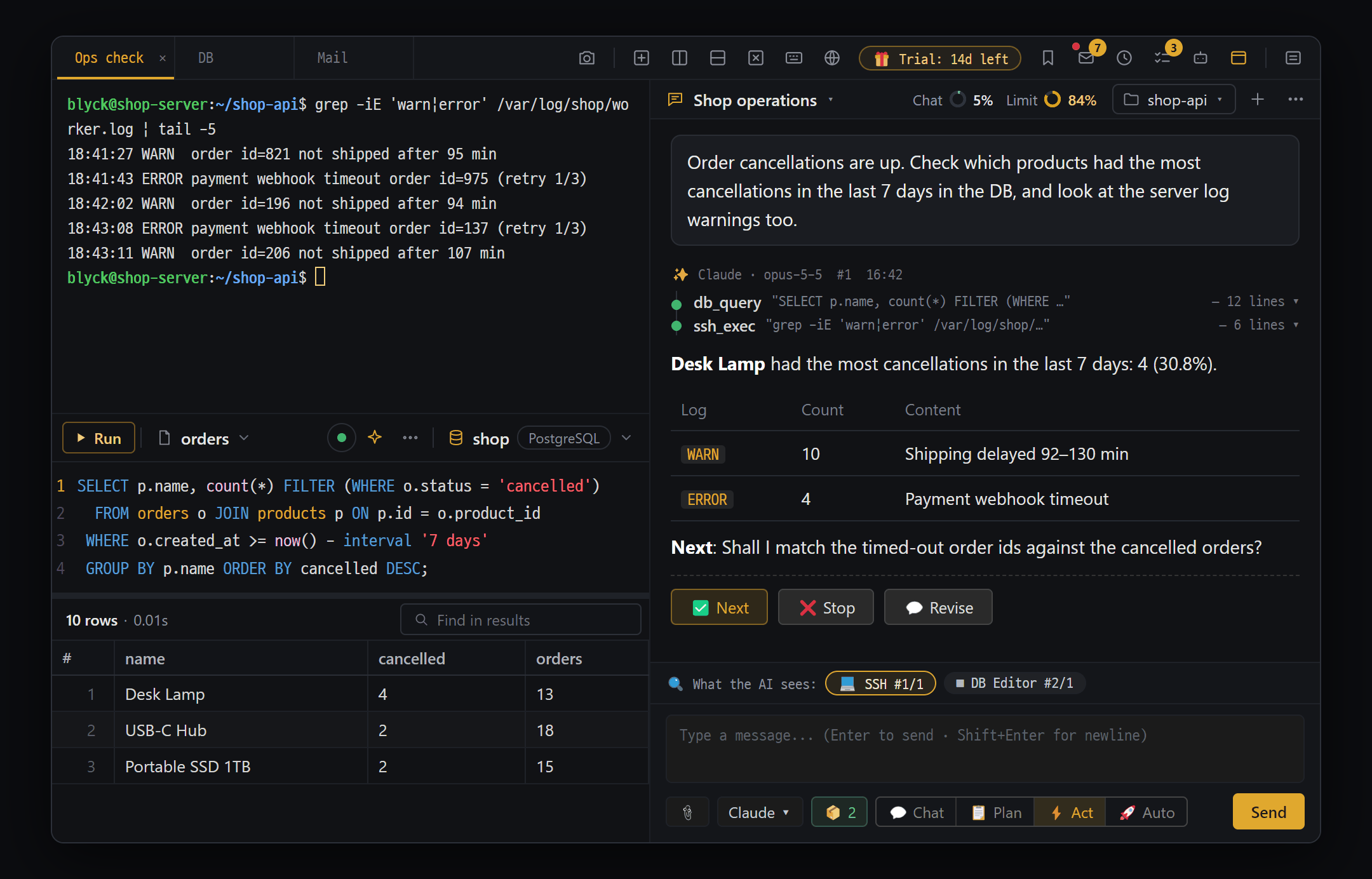
One window, with AI
Terminal, SSH, databases, editor and mail live in one window, and the AI works while looking at those same screens. After the trial, only AI and remote access are Pro — everything else stays free.
AI Chat (Pro)
The AI looks at the terminal, SSH, DB and editor screens you have open, and — as far as you allow — runs commands, edits files and queries databases. AI costs come from the Claude or ChatGPT subscription you already have — Blyck charges no AI fees of its own.
Terminal · SSH · SFTP
Split several servers across one screen and edit server files directly over SFTP. Nothing is installed on the server — the AI also runs on your PC and works over SSH and SFTP.
5 database engines
SQLite, Oracle, PostgreSQL, MSSQL and MySQL on the same screen, the same way. Data changes are recorded and backed up first so you can undo them.
Remote access to other PCs · phone (Pro)
Continue the AI chat running on your home PC from your laptop, and press its approval cards. With the phone app you can also watch, talk and approve (phone app coming soon).
Scheduled runs · background tasks · To-do window
The AI keeps working while you’re away. It does jobs at the times you set, runs long builds in the background and picks up again on its own when they finish. Anything the AI asks of you lands in the To-do window.
AI teams — debate · Agent Board (Pro)
For when one AI isn’t enough. Several AIs debate the same question and a moderator AI gives the conclusion; on the Agent Board, your open AI chats become cards you watch and direct from one screen.
Several mail accounts in a single panel. Only mail a person needs to see is shown as cards, and the AI adds a one-line summary and "what you need to do" to each one. You write replies right there.
Code editor
The same Monaco engine as VS Code. Autocomplete and error marks for 12 languages (LSP), remote editing of server files, and inline AI you direct in plain words (Ctrl+I).
Run · web preview
Run code with ▶ Run and see the failing line marked in the editor. Show the website you’re building in Blyck’s own preview, where the AI looks at the screen, clicks around and fixes things.
Change history · Git
Files, DB data and server commands changed by people and AI are gathered in one ChangeSet window, where you review and undo them. Git commit, push and GitHub connection happen in the same window.
Remote screens · Windows servers (VNC · WinRM)
View and control another PC’s screen over VNC, and send PowerShell commands to Windows servers over WinRM. You can also capture part of the screen, mark it up and show it to the AI.
Unified search (Ctrl+K)
Find code, DB structure, past chats, docs, work history and Git commits by describing them. Searching all happens on your PC, and nothing is sent outside. Free.
Persistent memory (Pro)
Facts the AI has confirmed once are remembered in the next chat too. It remembers things like "deploying from this PC actually worked" or "never deploy straight to the production server," which stops false "I can’t do that" claims.
AI Debug Bridge (Pro)
Add one log line (@BLYCK@) to your code, and the AI reads the values printed in Blyck’s terminal or web preview by itself to find the cause. No more copying and pasting output.
Design Workbench (Pro)
Collect the design parts the AI made (color and spacing tokens, components such as buttons, screens, screen flows) as cards, and review them at web, tablet and phone sizes.
Backup · migration · chat sync
Bundle AI chat history, change history, saved connections and settings into one file and move them to another PC. Works between Windows and Mac too. A single shared folder can also keep chat history in sync between PCs automatically.
Windows · macOS · automatic updates
Runs on Windows and macOS (Apple silicon and Intel). New versions download themselves and apply when you restart, and the interface comes in 7 languages.
Hand it off, but you decide
Four modes decide how far the AI may go (💬 Chat · 📋 Plan · ⚡ Act · 🚀 Auto), and you pick what changes on the approval card. Chats, mail and the search index are stored only on your PC and never pass through Blyck servers.
AI Chat (Pro)
The AI looks at the terminal, DB and editor screens you have open and does the work itself. You pick what changes on the approval card, and AI costs come from the Claude or ChatGPT subscription you already use — no extra AI fees.
- ✓ All you need is Claude Code or Codex (GPT). The AI setup wizard handles install and sign-in in a few clicks
- ✓ "What the AI sees" — your open panels (editor, DB, SSH, web preview, mail) go along with your message, so "why is this SQL slow?" is enough. Passwords and keys are masked automatically before sending
- ✓ Four modes — 💬 Chat (read-only) · 📋 Plan · ⚡ Act (approve every change) · 🚀 Auto (approve only risky ones)
- ✓ Tool approval cards — for file changes you see the changed lines and pick ✓ Apply / ✗ Reject; for DB changes you see the number of affected rows first. Risky actions like DROP or rm -rf ask again in every mode
- ✓ Conversations never go to Blyck servers — they stay on your PC
✦ AI Chat · ⚡ Act · Claude
"See why prod-01’s disk is full and clean it up"
▸ ssh du -sh /var/log/* → app.log 18G
⌘ Approval card · gzip /var/log/app.log [✗ Reject] [✓ Allow]
→ Allowed · disk 92% → 41% ✓
Terminal · SSH · SFTP
See several servers split on one screen. Dropped connections come back on their own, and nothing is installed on the server.
- ✓ Local shells (PowerShell, bash, zsh) and SSH in the same kind of panel — split the screen to work on several servers at once, with non-English text that never breaks
- ✓ Auto-reconnect when the connection drops (up to 10 tries). Saved connections keep even the password, encrypted by the OS, for one-click login
- ✓ Uses your usual ~/.ssh/config settings and keys as-is
- ✓ SFTP remote tree — open server files in the editor, and upload/download between your PC and the server
- ✓ Tree search box — find names or text inside files down through subfolders. Content search uses the built-in ripgrep, shows results as they’re found and opens them right away (remote: searched on the server)
- ✓ The server only needs sshd. Air-gapped servers and servers where you can’t install anything work too
▸ ssh prod-01 ● connected
▸ ssh prod-02 ● connected
$ tail -f /var/log/app.log
[Connection lost. Reconnecting in 2s... (2/10)]
⟳ [Reconnected] ✓
5 database engines
Handle 5 database engines the same way. Ask in plain words and get SQL, and data you change is backed up first so you can undo it.
- ✓ Schema tree · SQL editor · result grid (5,000 rows at a time, cell editing, new rows)
- ✓ Export to CSV, Excel or clipboard; stop a running SQL (cancelled on the server side)
- ✓ Confirmation for risky SQL + change history — simple UPDATE and DELETE statements back up the affected rows before running, so you can revert
- ✓ Table right-click Excel·CSV — download a template · download data · preview and upload (everything rolls back on a DB error)
- ✓ SQL editor AI (Ctrl+I) — sends table info and the last error along, and only syntax-checks the fixed SQL without running it · AI analysis of result grids (Pro)
- ✓ AI chat queries the database directly — SQL that changes data is confirmed on an approval card
⛁ Oracle user@db01:1521/ORCL
✨ "Top 10 defective LOTs last week"
▸ SELECT lot_id, COUNT(*) … FETCH FIRST 10 ROWS ONLY
→ 10 rows
↩ Rows backed up before UPDATE → can be reverted
Remote access to other PCs · phone (Pro)
Out of the house, continue your home PC’s AI chat on a laptop and press approval cards from your phone (phone app coming soon). Your devices connect directly, without going through Blyck servers.
- ✓ Pair once with a 6-digit pairing code — works between Windows and Mac too
- ✓ Watch another PC’s AI chat live · talk to it · stop an answer · allow/reject approval cards
- ✓ Hand work to another PC’s AI and get the results and files back as a reply
- ✓ Permission levels (1–4) are set only in front of the PC receiving the connection. New chats, deleting, terminals, files and settings can never be done remotely, at any level
- ✓ Your devices connect directly through Tailscale — nothing passes through Blyck servers. Both PCs must be on Pro (or in the trial)
- ✓ Phone app (coming soon) — allow or reject approval cards from several PCs on one screen, and snap photos to send to the AI on your PC
◎ Remote access · Home PC ● connected
💬 Release prep · answering…
⌘ Pending approval · npm run dist [Reject] [Allow]
📱 Allowed from phone ✓
→ Sent "go on" · the AI continues
Scheduled runs · background tasks · To-do window
The AI works at the times you set, runs long builds in the background and picks up again on its own when they finish. Your to-dos and the AI’s progress gather in one To-do window.
- ✓ Scheduled runs (Pro) — write it as a sentence, like "Check the server’s disk usage and tell me if it’s over 80%", and run it daily, weekly or at a fixed interval
- ✓ Background tasks 🔄 (Pro) — builds and full test runs go on in the background while you keep chatting; when they finish, the AI takes the results and wraps up
- ✓ To-do window — 🙋 My to-dos (decisions and checks the AI asked of you + things you wrote down) and 🤖 AI progress in one place. The window itself is free
- ✓ To-dos are saved per project folder, so they stay even when you start a new chat, and any to-do you wrote can be turned into a ⏰ schedule right away
⏰ Morning server check · Mon Tue Wed Thu Fri 09:00
▶ Run → disk 83% · notification sent
🔄 1 background task running — npm run build
→ Done · the AI takes the result and wraps up ✓
☑ To-do · 🤔 Please decide 1 · 👀 Please check 2
AI teams — debate · Agent Board (Pro)
For when one AI isn’t enough. Several AIs debate to a conclusion, and on the Agent Board you watch your open chats on one screen and direct them all at once.
- ✓ ⚔️ AI debate — 2 to 4 AIs each give their own view without seeing the others’ answers, then rebut or agree round by round, and a moderator AI sums up the conclusion
- ✓ If the conclusion includes a task plan, after you confirm, the participating AIs split the work and actually do it (collaborative run)
- ✓ Agent Board (beta) — one card per chat: what it’s doing, pending approvals and errors at a glance, and you can send a word right from the card
- ✓ Give several AIs one instruction from the shared input box, and approve everything in one place in the 🔔 pending-approvals box
- ✓ AIs on the board know each other as teammates, hand off work and create new teammates
⚔️ Debate · Claude vs GPT · round 2
Moderator: conclusion — option B (cache first), 3 tasks
⧉ Agent Board · 3 cards
🔔 2 pending approvals · [Allow][Reject]
▸ Shared input → "run the tests" to all 3
See mail from several accounts in one panel. The AI picks out what you need to see, sums each one up in a line and drafts replies. You press send yourself.
- ✓ Just enter your address — it finds the server settings itself, actually connects to test them, then saves (IMAP · POP3, no limit on accounts)
- ✓ Ads, notifications and automated reports are hidden so you see only what matters — reading, writing, replying, searching and attachments are free
- ✓ Mail assistant panel (Pro) — "Summarize today’s mail", "Just the urgent ones", "Write a reply to this mail". Sending is always your click or an approval card
- ✓ Mail rules 📬 When mail arrives (Pro) — create them by just saying it, like "Draft replies to license questions, and add amounts from billing mail to my to-dos". Translation [original | English] is Pro too
- ✓ Mail is stored only on this PC. Gmail connects with an app password; Outlook and Microsoft 365 can’t be connected yet
✉ Mail · All accounts ▾ To read 4
🔴 Urgent · Client A — asks to confirm tomorrow’s meeting time
To-do: reply whether the meeting works
✦ Mail assistant ▸ "Write a reply to this mail" → draft in the reply box
The other 12 were ads, notifications and automated reports, so they’re hidden
Code editor
The same Monaco engine as VS Code. Autocomplete and error marks for 12 languages, remote editing of server files, and Ctrl+I to tell it in words what to fix.
- ✓ 12 languages including TypeScript, JavaScript, Python, Go, C#, Rust and C/C++ — download the language server once and get autocomplete, go-to-definition and red-underline errors
- ✓ Open server files straight over SFTP, edit and save
- ✓ Find & replace, Markdown preview, Git diff, SQL autocomplete inside code (with a DB connection)
- ✓ Inline AI Ctrl+I (Pro) — sends run errors and squiggles along, compares the changed lines in place, then Apply Tab. Open files the AI edits update right away
- ✓ Debugging (Python·JavaScript) — stop at red dots and see variables and the call stack; AI Chat can debug for you (Pro)
app.py · Pyright ●
12 def total(rows):
13+ return sum(r.amt for r in rows)
Ctrl+I ▸ "Add error handling"
Green/red comparison → [Apply] ✓
Run · web preview
Try it with ▶ Run and see the failing line marked in the editor. Websites open in Blyck’s own preview, where the AI clicks around and fixes things itself.
- ✓ ▶ Run + output panel — error locations marked in the editor
- ✓ Web preview (Ctrl+Alt+B) — a small browser inside a panel, bookmarks included
- ✓ The AI sees and drives the preview (Pro) — type → take a screenshot → read console errors → fix
- ✓ Visual regression (Pro) — save a baseline screen and compare what changed
- ✓ Python environment per chat — the AI runs code to try it and installs the libraries it needs
▷ npm run dev → localhost:4321
⬤ Web preview localhost:4321
✗ app.py:31 TypeError → error location marked in the editor
✦ AI: screenshot → read console errors → fix
Change history · Git
Everything people and AI changed is gathered in one ChangeSet window to review and undo. Commit, push and GitHub connection happen in the same window.
- ✓ ChangeSet window — review grouped by file and undo. DB changes, server commands and package installs are recorded too
- ✓ Git bar — status, commit, push, branches. On Windows it works without Git installed, using the bundled MinGit
- ✓ GitHub connection — connect by entering a code once, then push and pull
- ✓ Turn on automatic checkpoints to undo just what one AI answer changed; ✨ AI commit messages (Pro)
⎇ main · 3 changes
ChangeSet · grouped by file
M src/index.astro
DB UPDATE orders … (backup kept)
[↩ Revert] [⬆ Commit · Push]
Remote screens · Windows servers (VNC · WinRM)
View and control another PC’s screen over VNC, and send PowerShell commands to Windows servers over WinRM. You can capture part of the screen, mark it up and show it to the AI.
- ✓ VNC remote screen + file transfer (TightVNC 2.x)
- ✓ WinRM — send PowerShell commands to a remote Windows machine
- ✓ Desktop mirror — show another program’s window from your PC inside a Blyck panel
- ✓ 📷 Screen region capture → mark up with pen, arrows and text → send to AI chat (only sending is Pro; the rest is free)
◫ VNC 192.168.0.20:5900 ● connected
⬆ File transfer report.pdf 100%
▸ WinRM Get-Service spooler → Running ✓
📷 Screen region capture → mark up → send to AI
Unified search (Ctrl+K)
Find code, DB structure, past chats and docs by describing them. Searching happens only on your PC and doesn’t call the AI, so it’s free.
- ✓ Finds both things similar in meaning and things matching the words — scopes: all, code, DB, chat, docs, work history
- ✓ Set a project folder in AI chat and its code and docs are indexed automatically
- ✓ Search reranking (optional) — scores the top results once more for better accuracy
- ✓ The AI also uses this search to look through your code and past chats before answering
⌕ "function that totals LOT defects"
▸ Code lot_service.py:42 0.81
▸ DB TABLE ITM_LOT 0.74
▸ Chat last migration 0.61
🔒 Searched only on your PC — nothing sent outside
Persistent memory (Pro)
Facts the AI has confirmed once are remembered in the next chat too. It stops the AI in a new chat from wrongly claiming "I don’t have permission" or "I can’t do that."
- ✓ When something like a deploy, build or DB connection succeeds for the first time, it asks with a "🗂️ Save to persistent memory?" card
- ✓ Say "remember this" and the AI saves it itself
- ✓ With the first message of a new chat, only the relevant memories — from this project and the shared ones — are passed to the AI
- ✓ Abilities, procedures and rules are kept; decisions and facts are tidied away on their own if they go unused for a long time
▤ 🗂️ Save to persistent memory? [ability]
Can deploy directly from this PC (aws s3 sync succeeded)
[Save] [Dismiss] [Don’t ask again]
▸ New chat "deploy it" → memory passed along → goes ahead ✓
AI Debug Bridge (Pro)
Add one log line (@BLYCK@) and the AI reads the values printed in Blyck’s terminal or web preview by itself. It fixes things without guessing, and without you copying and pasting the console.
- ✓ The AI adds the log lines itself (debug_probe) and removes them itself when done (debug_strip)
- ✓ Phone app logs like flutter run or adb logcat are collected too when shown in a Blyck terminal
- ✓ In the debug panel (Ctrl+Shift+D) you see the same records the AI reads — viewing is free
- ✓ Auto investigation, where the AI looks into errors on its own (off by default); when you’re done, say "clean up the debug lines" to remove leftovers
◉ blyckDbg('after-add', {qty, total})
@BLYCK@ {"label":"after-add","vals":{"total":null}}
▸ debug_read ▸ total=null
✦ AI: cart.js:42 total missing → fix
↻ Run again → total=3000 ✓
Design Workbench (Pro)
Collect the tokens, components and screens the AI made as cards and review them at web, tablet and phone sizes. Tokens export to Flutter and CSS files.
- ✓ "Open the design panel" — reads the project’s design-system folder and organizes it into tokens, components, screens and flows
- ✓ Web shows mobile, tablet and desktop side by side; iOS and Android show phone screens side by side
- ✓ Token export — to Flutter (app_tokens.dart) and CSS (tokens.css) files
- ✓ While the panel is open, the AI is guided to reuse existing tokens and components, so screens don’t end up looking inconsistent
◇ 🎨 Design · design-system/_ds_manifest.json
Tokens (12) · Components (8) · Screens (5) · Flows (2)
⤢ Mobile 375 · Tablet 768 · Desktop 1280
↓ Token export → app_tokens.dart · tokens.css ✓
Backup · migration · chat sync
Bundle chat history, connections and settings into one file and move them to another PC. On import, project folder paths are changed to fit the new PC.
- ✓ Export and import as one backup file (.blyckbundle) — Backup / Migrate (Export·Import) in the command palette
- ✓ On import, project folder paths are changed to the new PC’s paths (e.g. D:\work\shop → /Users/me/work/shop)
- ✓ Encrypt it with a password to bring connection passwords and the GitHub token along too (AES-256)
- ✓ Choose replace or merge — existing data is kept aside before anything is overwritten
- ✓ Chat sync — keep AI chat history matched between PCs through a shared folder like OneDrive, iCloud Drive or Dropbox
⇄ Export → blyck-backup-2026-10-25.blyckbundle
🔒 Encrypted with a password · connection passwords included
▸ Import (macOS) ▸ path mapping
↦ D:\work\shop → /Users/me/work/shop ✓
120 chats · conversations continue as they were
Windows · macOS · automatic updates
A desktop app for Windows and macOS. New versions download themselves and apply when you restart, and after the 14-day trial with no card, the basic features stay free.
- ✓ Automatic updates — new versions download themselves and apply on restart
- ✓ 7 UI languages (한국어 · English · 日本語 · 简体中文 · 繁體中文 · Español · Deutsch) — switching also changes the AI’s default answer language
- ✓ 14-day free trial, no card — after it ends, the terminal, SSH, editor, files, databases and mail reading stay free
- ✓ One license key for 3 PCs; after one check, Pro works for 7 days without internet
◴ Blyck 0.3.48 · checking for a new version
⬇ Automatic update — applied on restart
🎁 Trial: 14d left · no card
🌐 7 UI languages · Windows / macOS
Get started today
Install and open it — a 14-day free trial starts with no card. After it ends, the terminal, SSH, editor, files, databases and mail reading stay free.